Shogi
Play instantly in your browser (no download needed)
Just open this page and the game starts. No unzipping or installation required.
How to play
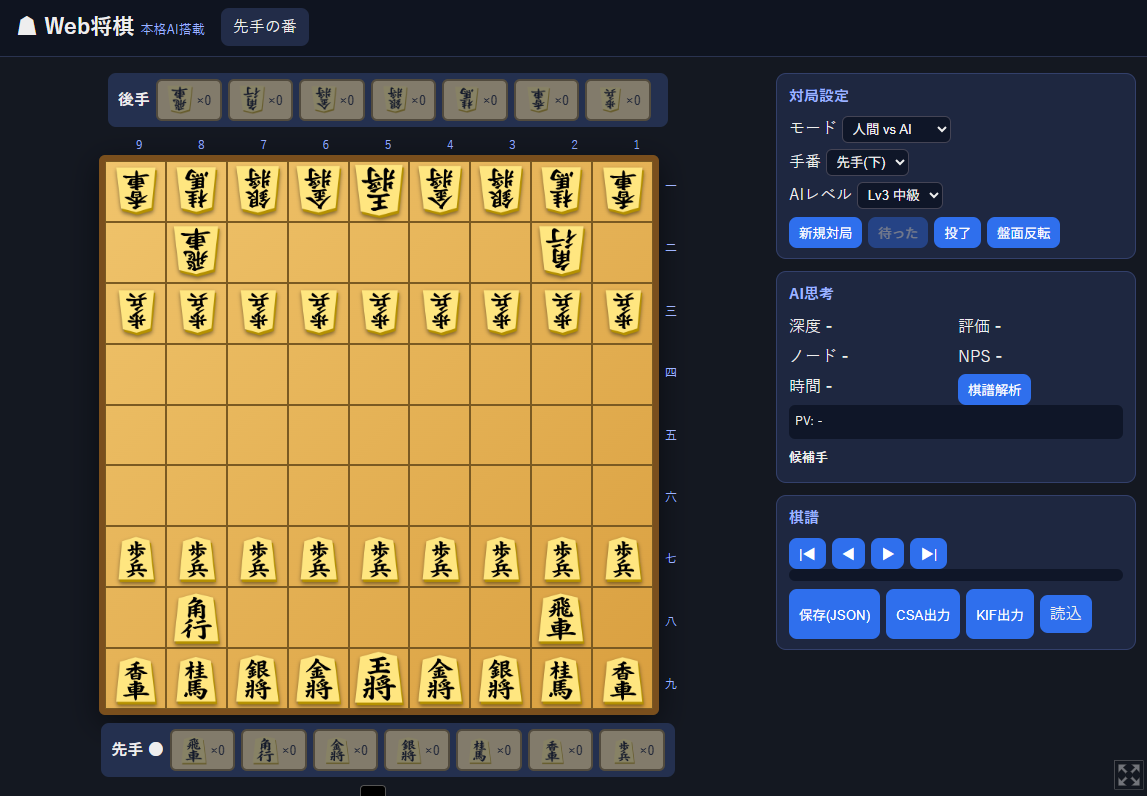
- The shogi board appears right on this page
- Click a piece, then click the destination square to move
- A dialog asks when promotion is available (OK = promote / Cancel = don't promote)
- To drop a captured piece, click it in your hand, then click the target square
Game modes
- Human vs AI (play as sente or gote, 6 levels from Lv1 to Lv6)
- Human vs Human (take turns on one screen)
- AI vs AI (watch; set each side's level independently)
AI thinking display
The UI never freezes while the AI thinks. Depth, nodes, NPS, evaluation, candidate moves, and the principal variation (PV) are shown in real time.
Kifu (game record) features
- Step forward/backward through the game
- Save (JSON), CSA/KIF export and import
- “Analyze” button runs multi-PV analysis of the current position
Requirements: a recent Chrome / Edge / Firefox / Safari. Playable on smartphones too.
ブラウザでそのまま遊べます(ダウンロード不要)
このページを開くだけで将棋が始まります。ZIPの解凍やインストールは必要ありません。
遊び方
- ページ内の将棋盤が表示されたら開始です
- 駒をクリック → 移動先のマスをクリックで指せます
- 成れる駒は確認ダイアログが出ます(OK=成る/キャンセル=不成)
- 持ち駒を使うときは、手駒のボタンを押してから置きたいマスをクリックします
対局モード
- 人間 vs AI(先手・後手を選択可、Lv1〜Lv6の6段階)
- 人間 vs 人間(2人で交互に指す)
- AI vs AI(観戦。両者のレベルを個別設定可)
AIの思考表示
AIが考えている間も画面は固まりません。深度・ノード数・NPS・評価値・候補手・読み筋(PV)がリアルタイムに表示されます。
棋譜機能
- 棋譜の前後移動で局面を振り返り可能
- 保存(JSON)・CSA/KIF出力・読み込み対応
- 「棋譜解析」ボタンで現局面の候補手を解析できます
動作環境:最新のChrome / Edge / Firefox / Safari。スマートフォンでも遊べます。
Leave a comment
Log in with itch.io to leave a comment.